<!DOCTYPE html PUBLIC "-//W3C//DTD XHTML 1.0 Transitional//EN" "http://www.w3.org/TR/xhtml1/DTD/xhtml1-transitional.dtd">
<html xmlns="http://www.w3.org/1999/xhtml">
<head>
<meta http-equiv="Content-Type" content="text/html; charset=utf-8" />
<meta name="Keywords" content="Scan The Sun - Solar panels optimization" />
<meta name="Description" content="Scan The Sun - Solar panels optimization" />
<meta name="viewport" content="width=device-width; initial-scale=1.0;">
<title>Scan The Sun - Solar panels optimization</title>

<link href="../style2.css" rel="stylesheet" type="text/css" />
</head>
<body link="#3300FF" vlink="#0066FF" alink="#3300FF"  >
<table width="100%" style="padding-left:20px;padding-right:20px">
	<tr>
		<td>
<img src="../main/logo.png" width="120px" height="16px" style="float:left;margin-right:20px"/><div style="font-family: \'Lucida Sans Unicode\', \'Lucida Grande\', sans-serif;font-size: 11px;color: #261915;font-weight: normal; margin-left:20px"> About Scan The Sun mobile application</div></td></tr><tr><td>
 
</td></tr></table>

<script type="text/javascript" src="../jquery-1.10.2.min.js"></script>
<script type="text/javascript" src="../form_tools.js"></script>
<script type="text/javascript" src="../geneic_requests.js"></script>
<script type="text/javascript">
function linkto(sLink)
{
	location.assign(sLink);
}
</script>

	
		<div style="width:300px;float:left;margin:20px">
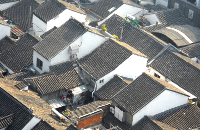
			<img src="picture1.png" style="float:left; margin-right: 10px;" width="150px"/><div class="elementsTitle">APPLICATION</div><div class="elementsContent">ScanTheSun is an application for adjusting PV-panels or solar collectors to get maximum operational efficiency. <br/><br/><br/><br/><br/><br/>ScanTheSun enables you: <ul><li>Minimization of energy loss due to wrong orientation of the panel as well as due to incorrect placement with respect to surrounding trees/buildings.</li><li>Reliable planning of the panels mounting. You will choose the best position on the roof and decide on usage of additional stands.</li><li>Acquiring an information on hours of electric energy production or water warming by your panels. </li></ul> The Application takes into account the buildings or trees around your panel and enables its adjustment even in complicated urban surroundings. You can use ScanTheSun for adjusting of panels <br/><ul><li>on detached houses</li><li>on houses in urban areas</li><li>in PV-panels operated devices in cities or parks (like bicycle docking stations etc.)</li><li>in traffic solar devices</li></ul></div>
</div>
		<div style="width:300px;float:left;margin:20px">
			<img src="picture7.png" style="float:left; margin-right: 10px;" width="150px"/><div class="elementsTitle">TECHNICAL SPECIFICATION</div><div class="elementsContent"> What makes ScanTheSun a unique application?<br/><br/><ul><li>Elliptic shape of the Earth's orbit is taken into account by calculation of the Suns position on the sky. Thanks to that, the Sun position is computed with 0,1 degree of precision. This precision will hold for calculations up to the year 2055.</li><li>Atmospheric refraction of the light going through the thickness of atmosphere depending on the incidence angle is taken into consideration.</li><li>To get higher precision of the crossing points of the contoured horizon and the paths of the sun, the barycentric coordinates in a triangle geometry have been applied.</li><li>Vector openGL graphics together with quaternions and matrix algebra has been used to get faster rendering.</li><li>Advanced stereometry and matrix algebra enable sensor calibration and camera view-angle measurement.</li><li>Differential calculus is used to calculate the energy stream picked up by the panels taking into account its orientation, sun trajectory, atmospheric refraction and shade cast by trees/buildings.</li><li>Multithread architecture of the application consists evenly of four processes working in parallel. Multithreading ensures smooth work of the application. Thanks to schedulers, the application works well even on old, single core devices.</li><li>ScanTheSun is available in multiple languages. Presently it supports English, German, Italian and Polish. It will also support additional languages in the near future.</div>
</div>
		<div style="width:300px;float:left;margin:20px">
			<img src="picture2.png" style="float:left; margin-right: 10px;" width="150px"/><div class="elementsTitle">BRIEF DESCRIPTION</div><div class="elementsContent">ScanTheSun utilizes your geolocation data to calculate the trajectory of the Sun in the sky for any day of the year according to the present astronomical knowledge. Then, the maximum available solar energy is computed for a given latitude. This maximum available energy may be picked up by panels placed in deserted areas, but how many of us lives in the desert? In most cases sPV-panels are mounted in the midst of trees, buildings or other obstacles hindering the sunlight. With ScanTheSun you can contour the horizon and take into account all obstacles around. In this way it is possible to reliably adjust a panel even in extremely difficult areas like centers, wooded areas, gardens.</div>
</div>
		<div style="width:300px;float:left;margin:20px">
			<img src="picture3.png" style="float:left; margin-right: 10px;" width="150px"/><div class="elementsTitle">ANDROID</div><div class="elementsContent">ScanTheSun is an application for mobile ANDROID devices. It is adapted for the default configuration of most devices.</div>
</div>
		<div style="width:300px;float:left;margin:20px">
			<img src="kolko_en.png" style="float:left; margin-right: 10px;" width="150px"/><div class="elementsTitle">FREE APP</div><div class="elementsContent">ScanTheSun is a free application. The application and the scanthesun.com webservice are kept in operation thanks to supporting companies for which I am very grateful. <span onclick="linkto('../support/support.php?lang=EN')" style="cursor:pointer;text-decoration:underline"> Click here for more details on how to support.</span><br/><br/><br/><br/><br/><br/></div>
</div>
		<div style="width:300px;float:left;margin:20px">
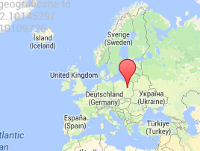
			<img src="picture4.png" style="float:left; margin-right: 10px;" width="150px"/><div class="elementsTitle">GEOLOCATION MODULE</div><div class="elementsContent">Structure of the ScanTheSun app is based on three modules. Module 1 enables you to get your geolocation either with Google Maps or with the GPS sensor. Your actual geographical location is crucial by calculating the Suns position in the sky as well as by computing the maximum available solar energy. Your geolocation data is not collected nor sent outside of your device to any third party companies. <br/><br/><br/> <br/></div>
</div>
		<div style="width:300px;float:left;margin:20px">
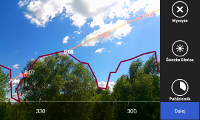
			<img src="picture5.png" style="float:left; margin-right: 10px;" width="150px"/><div class="elementsTitle">SURROUNDINGS MEASUREMENT MODULE</div><div class="elementsContent">Module 2 is an extended reality application, where all measurements related to the surroundings of the panels are performed. Measurement of the panels surrounding is done intuitively through contouring the horizon line by touch. The contour, containing buildings, trees or other obstacles, can be done easily with the touchscreen on which the camera preview is displayed. All screen touch data is then transformed to the physical space with help of adapted matrix algebra. The trajectory of the Sun in the sky for any day of the year, and its crossings with the contoured horizon are also displayed on the camera preview screen. Special matrix algebra allows you to also calibrate all important sensors in devices where the sensors are working incorrectly.</div>
</div>
		<div style="width:300px;float:left;margin:20px">
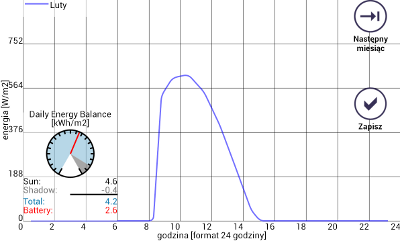
			<img src="picture6.png" style="float:left; margin-right: 10px;" width="150px"/><div class="elementsTitle">PANELS ADJUSTMENT MODULE</div><div class="elementsContent">Module 3 performs multiple calculation of the Suns trajectory in the sky for each day of the year. Each trajectory takes into account sections in which Sun is behind trees or buildings. These sections are calculated based on the contoured horizon from Module 2 with the help of the barycentric coordinates of the contour sections. A solar energy stream is calculated  for all positions of the Sun along the trajectory. An integral of the energy stream over time allows to calculate the energy picked up by the panel as a function of its orientation. A colour-gradient map displayed on the screen helps in finding the best orientation of the panel and the percentage solar energy caught. This module allows you to also create daily energy curves presenting the energy collected during each hour. These curves are especially helpful in preparing the documentation for customers. They show also the hours of energy collection by your panel.</div>
</div>
		<div style="width:300px;float:left;margin:20px">
			<img src="logo.png" style="float:left; margin-right: 10px;" width="150px"/><div class="elementsTitle">AUTHOR</div><div class="elementsContent">After completing my PhD in 2007 I am currently working at the Faculty of Physics at the University of Warsaw. Quest for spontaneous time-reversal symmetry breaking in nuclear matter is my research field. I have used my knowledge of algebra, mathematical analysis, astronomy, programming languages (java, c++), script languages (javascript, php), database servers (mySQL) along with my passion for programming by creating the ScanTheSun mobile application. I hope it satisfies your expectations. As an author of the application I would like to call your attention on the possibility of supporting the ScanTheSun. <span onclick="linkto('../support/support.php?lang=EN')" style="cursor:pointer;text-decoration:underline"> Click here for more details on how to support.</span><br/><br/> Ernest Grodner</div>
</div>
		</body>
	</html>